Learning IT in School: Professional PPT Templates for Education
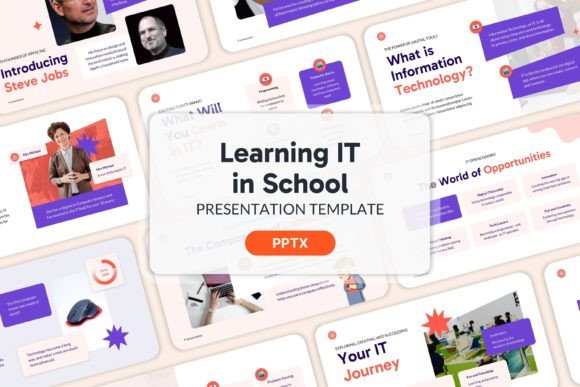
Creating a presentation for an educational or technical audience requires more than just bullet points on a slide. When you are dealing with the complexities of Information Technology (IT) curricula, software tutorials, or digital literacy programs, the visual medium needs to support the logic of the content. This is where the specific utility of the Learning IT in School - PPT Templates comes into play. It is not merely a decorative background; it is a structured environment designed to handle technical information with clarity and professionalism.
Understanding the Structure
The primary value of this specific template set lies in its organization. The package includes 20 distinct slides, which is a sweet spot for a focused lecture, a workshop module, or a business proposal regarding educational services. Because the design is professional and creative, it bridges the gap between a sterile classroom lecture and a corporate pitch. If you are a freelancer pitching IT training services to a local school district, or an internal trainer onboarding new staff on software protocols, these templates provide the necessary authority without being overly rigid.
One of the most notable features of the Learning IT in School - PPT Templates is the inclusion of master slides. For those unfamiliar with PowerPoint’s advanced functions, master slides allow you to control the global design of your presentation from a single location. This ensures that fonts, colors, and logos remain consistent across all 20 slides. If you decide to change the accent color from blue to green halfway through the process, you do not need to edit every single slide individually. This feature is a massive time-saver for busy educators and entrepreneurs who need to maintain brand consistency but cannot afford to spend hours tweaking layouts.
Practical Application in the Classroom and Beyond
While the name suggests a focus on school environments, the application is much broader. The "School" in the title refers to the subject matter—IT education—but the design is versatile enough for commercial use. Consider a startup that sells coding kits to parents. They could use this template to present their product roadmap to investors. The clean layout allows for the insertion of charts, graphs, and technical specifications without the slide looking cluttered.
For educators, the challenge is often engagement. A wall of text on a slide causes students to disengage immediately. The Learning IT in School - PPT Templates addresses this by utilizing image placeholders effectively. The design encourages a "less is more" approach to text, prompting the presenter to use visuals to explain complex concepts like network topology or binary code. Since the Zip file contains no images, you are free to add your own screenshots, diagrams, or high-resolution photos of your classroom or lab. This flexibility ensures the presentation feels authentic to your specific environment rather than generic.
Key Features for Content Creators
If you are a content creator or a blogger focusing on tech education, consistency is key to building a brand. You might be creating a series of video tutorials or hosting a webinar. Using the Learning IT in School - PPT Templates ensures that every piece of content you produce looks polished. The fully organized layers mean that even if you are not a design expert, you can produce slides that look like they came from a professional agency.
Here is a breakdown of why the features matter for specific user groups:
- For Marketers: The color scheme is pre-selected to be professional, meaning you don't have to worry about clashing colors that distract from your pitch. It helps in maintaining visual hierarchy, guiding the client’s eye to the most important data points.
- For Educators: The 20-slide limit helps enforce discipline in lesson planning. It forces you to distill your knowledge into the most critical takeaways, which is a proven method for better student retention.
- For Business Owners: When introducing a new internal IT policy or software tool to your team, the professional aesthetic of these templates signals that the change is serious and well-managed.
Customization and Branding
A template is only as good as its ability to be customized. The Learning IT in School - PPT Templates is designed as a blank canvas within a structured framework. Because the download is free of stock images, you avoid the awkward situation of using a photo that your competitor is also using in their presentation. You can insert your own branding elements—logos, team photos, and proprietary diagrams—seamlessly.
Imagine you are a freelance IT consultant. You meet a potential client who needs a breakdown of a cybersecurity audit. You can open this template, insert your agency’s logo into the master slide, and populate the slides with your specific audit methodology. Within 30 minutes, you have a bespoke presentation that looks like it took days to design. This efficiency allows you to respond to leads faster, which is often the difference between winning and losing a contract.
Visualizing Technical Data
IT presentations often suffer from "data dump"—cramming too much code or too many statistics onto one slide. The layout of the Learning IT in School - PPT Templates is designed to mitigate this. The image placeholders are sized to accommodate flowcharts or UI mockups, which are essential in IT discussions. By using these placeholders, you are forced to break down complex topics into digestible visual chunks. This is particularly useful when explaining concepts to non-technical stakeholders, such as a school board or a marketing department.
Considerations for Implementation
When you download and begin using the Learning IT in School - PPT Templates, keep a few practical tips in mind. First, because the template is designed for a broad audience, you may want to tweak the font pairing to match your organization's specific style guide. The master slides make this easy. Second, pay attention to the flow of the 20 slides. Ensure that your narrative follows a logical progression: introduction, problem statement, solution (the IT aspect), implementation, and conclusion.
Furthermore, while the template is ready to use, it benefits greatly from high-quality assets. Since you are adding your own images, ensure they are high-resolution. Blurry screenshots of code or pixelated logos can undermine the professional foundation the template provides. Take the time to crop your images to fit the placeholders perfectly.
Who Benefits Most?
The versatility of the Learning IT in School - PPT Templates makes it suitable for a wide range of professionals. Teachers can use it for daily lessons or parent-teacher conferences. IT managers can use it for quarterly reviews. Startup founders can use it to explain their tech stack to angel investors. Even hobbyists running community workshops on coding or hardware repair can leverage the professional design to appear more credible and organized.
Ultimately, the goal of any presentation tool is to reduce the friction between your ideas and your audience's understanding. By handling the design heavy lifting—color theory, layout, and organization—this template allows you to focus on what matters most: the content of your IT lesson or business proposal. It is a practical, efficient, and visually appealing solution for anyone operating in the intersection of education and technology.