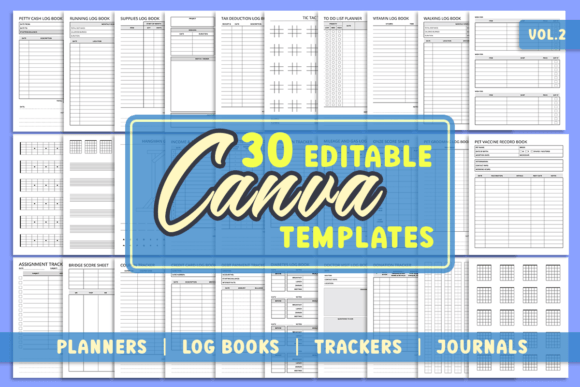
30 Editable Canva Templates for KDP 2: Your Shortcut to Professional Low-Content Books
If you have ever stared at a blank canvas trying to design a planner, logbook, or specialized notebook from scratch, you know how time-consuming the process can be. Aligning text boxes, setting margins for KDP (Kindle Direct Publishing), and ensuring the layout actually works for the user is often the biggest hurdle for self-publishers. This is where a resource like the 30 Editable Canva Templates for KDP 2 comes into play. It is designed to bridge the gap between an idea and a finished, print-ready interior file.
This collection is not just a folder of static PDFs. It is a curated pack of 30 Editable Canva Templates for KDP 2 that allows you to dive directly into the design phase. Because every template is hosted on Canva, you can edit them using a completely free account. There is no need for expensive software like Adobe InDesign or Photoshop, and the files contain no premium elements, meaning you will never be hit with a paywall when trying to download your final product. The dimensions are set to the industry-standard 8.5 x 11 inches with no bleed, making them perfect for standard KDP submissions or for printing at home or in a local office supply store.
Turning Hobbies into Functional Notebooks
One of the standout aspects of this pack is how it caters to specific hobbies that are often underserved by standard stationery. Consider the Guitar Tab Notebook, Guitar Cord Notebook, and Guitar Neck Notebook templates included in the bundle. If you are a musician or a designer targeting musicians, creating a generic lined notebook is easy, but formatting the neck diagrams or tab lines correctly is tedious. These templates provide the structure, allowing you to focus on the cover design or niche marketing.
Similarly, the inclusion of a Genkouyoushi Notebook is a massive time-saver for those targeting the Japanese language learning community. This specific grid layout is essential for practicing Kanji, but getting the exact grid dimensions right on a blank page can be frustrating. With the template, the grid is already there; you simply adjust the size or styling to fit your brand. The same applies to the Tattoo Sketchbook. Tattoo artists and apprentices often need high-quality sketch paper with specific layouts. Using these templates, you can create a professional portfolio book without worrying about the technical setup of the interior pages.
Organizing Finances and Business Operations
For entrepreneurs, freelancers, and small business owners, organization is everything. The 30 Editable Canva Templates for KDP 2 includes several interiors that serve as practical business tools. Take the Petty Cash Log Book or the Credit Card Log Book. While apps exist for these tasks, many people still prefer the tactile experience of writing down expenses to stay mindful of their spending. If you run a stationery business, offering a customized version of these logs can attract a demographic that values physical record-keeping.
The Tax Deduction Log Book is another prime example. Come tax season, freelancers scramble to organize their receipts. A well-designed logbook that categorizes expenses based on common deduction types is incredibly valuable. You can use the template to add specific categories relevant to a niche industry, such as "Real Estate Agents" or "Rideshare Drivers," turning a generic template into a targeted tool that solves a specific problem.
Health, Wellness, and Pet Care Scenarios
Managing health often requires meticulous tracking, and this is where the pack shines for the wellness market. The Diabetes Log Book and Medication Tracker are perfect for creating supportive resources for patients or the elderly. A family member could use these templates to create a personalized health journal for a loved one, printed at home, containing all their specific medication schedules. Similarly, the Intermittent Fasting Tracker taps into a massive health trend. By using the template, you can create a journal that helps users track their eating windows and hydration levels without needing to design a complex grid system from scratch.
Pet owners are another passionate demographic. The Pet Vaccine Record Book and Pet Grooming Log Book are practical items that make great gifts or products for veterinary offices. Imagine a local groomer wanting to give their clients a branded booklet to track their dog's grooming schedule. They can take the 30 Editable Canva Templates for KDP 2, upload their logo, change the font colors to match their brand, and have a PDF ready for the print shop in under an hour.
Practical Lifestyle and Travel Tools
Everyday logistics also feature heavily in this collection. The Mileage and Gas Log Book is essential for anyone who drives for work. While a spreadsheet works, a physical book kept in the glove compartment is often more convenient for drivers. If you are creating content for delivery drivers or salespeople, this template allows you to pre-fill specific fields that might be relevant to their reimbursement claims.
For the socially conscious, the Donation Tracker and Coupon Tracker offer unique organizational solutions. The donation tracker helps charitable individuals keep records for tax purposes, while the coupon tracker is a lifesaver for extreme couponers who need to manage expiration dates and categories. Even something as specific as the Onze Score Sheets or Bridge Score Sheets addresses a very loyal audience of card players who appreciate having dedicated books for their game nights.
Considerations for Editing and Printing
When working with the 30 Editable Canva Templates for KDP 2, it is helpful to keep a few practical considerations in mind. Because the templates are set to "No Bleed," they are ideal for standard composition notebooks or KDP uploads where full-bleed ink coverage isn't required. However, if you plan to add a background color that goes to the edge of the page, you will need to adjust the dimensions slightly within Canva to account for bleed, usually by adding 0.125 inches to the width and height.
The files are delivered as a PDF with links. This is a specific workflow choice to ensure you can access the Canva editor easily. Once you click the link and copy the template to your Canva account, you have full control. You can duplicate pages, change fonts, and upload images. Because the file types available include PNG with a transparent background and JPEG, you are not limited to just PDF printing. You could theoretically use these templates to create individual inserts for a binder planner or digital stickers for an iPad.
Ultimately, the value of this pack lies in the speed of execution. Whether you are a KDP publisher looking to expand your catalog, a small business owner wanting to create branded stationery, or a hobbyist looking to organize your passion project, these templates remove the technical barriers. They allow you to focus on the creative and functional aspects of your project, ensuring the final product is something people will actually want to use. The 30 Editable Canva Templates for KDP 2 provides the skeleton; you provide the personality.