Editable Gmail Signature Templates: Build a Professional Brand
In the digital age, your email signature is often the final impression you leave with a client, collaborator, or potential customer. It is more than just a digital business card; it is a consistent touchpoint for your brand identity. However, many professionals struggle with the technical complexities of creating a polished, functional signature that works across different devices. This is where Editable Gmail Signature Templates come into play, offering a bridge between professional design and user-friendly functionality. By leveraging tools like Canva, these templates allow you to transform a plain text sign-off into a dynamic brand asset.
For freelancers, entrepreneurs, and small business owners, consistency is key. When you use a premium template, you ensure that every email sent from your account reinforces your professional image. These templates are not just about aesthetics; they are about building authority. Whether you are sending a pitch to a new client or a newsletter to your subscribers, a well-designed signature suggests that you pay attention to detail in all aspects of your business.
The Power of Canva Integration
One of the most significant advantages of these templates is the reliance on Canva as the primary editing tool. Canva is a free, web-based graphic design platform known for its intuitive drag-and-drop interface. This means you do not need to be a graphic designer or know how to code HTML to create a stunning signature. The Editable Gmail Signature Templates provided are designed to be opened directly in Canva, where you can instantly see the changes you are making.
This integration solves a common problem: the "black box" of email signature HTML. Traditionally, editing an email signature required digging into source code to change a font color or swap an image. With Canva, the process is visual and immediate. You can experiment with different layouts and color schemes to see what best represents your brand before you ever copy the code into your Gmail settings. This visual approach simplifies the decision-making process and ensures the final result matches your vision perfectly.
Customizing Your Visual Identity
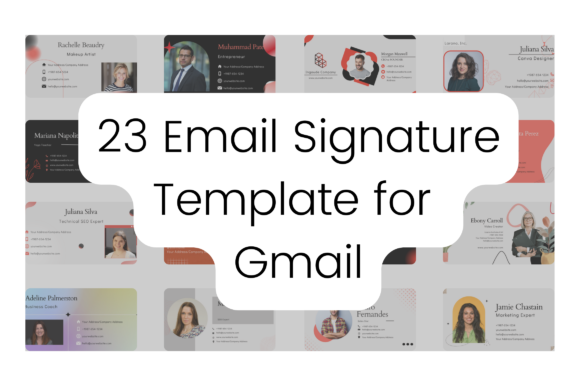
Every brand has a unique personality, and your email signature should reflect that. The templates included in these packages are fully customizable, allowing you to modify every visual element to align with your brand guidelines. You can easily change the background color to match your logo, swap out the default fonts for your brand’s typeface, and upload your own high-resolution profile picture or company logo.
Furthermore, the elements within the templates are movable. If you prefer your social media icons on the left rather than the right, you can simply drag them into place. This level of control ensures that your Editable Gmail Signature Templates feel bespoke rather than generic. It allows you to create a cohesive visual experience from the moment a recipient opens your email until they click on your website link in the signature footer.
Practical Benefits for Outlook and Gmail Users
While the focus is often on Gmail, modern professionals frequently use multiple email clients. A high-quality template package addresses this by offering compatibility with other platforms like Microsoft Outlook. This is particularly important for corporate environments or individuals who manage both personal and business accounts across different software. The adaptability of these templates means you can maintain a uniform brand presence regardless of the platform your recipient is using.
The practicality extends to the file formats available for download. Once you have finished designing in Canva, you have the freedom to download your creation in various formats, including PNG, SVG, JPG, and PDF. This versatility is crucial for different use cases. For instance, you might need a high-quality PDF for print materials or a PNG for your digital signature. The ability to resize the templates—starting from a standard 400 x 200 px—ensures that your signature remains crisp and legible on both large desktop monitors and smaller mobile screens.
Streamlining the Setup Process
For many, the technical setup of an email signature is the biggest hurdle. To address this, comprehensive template packages include an Instructions PDF. This guide typically walks you through the process step-by-step, from accessing the Canva link to pasting the final signature into your Gmail settings. It removes the guesswork and technical anxiety, making the process accessible even to those who are not tech-savvy.
Additionally, the inclusion of Sample Signatures serves as a valuable source of inspiration. Seeing how others have customized the templates can spark ideas for your own design. It helps you understand how to balance text with imagery and how to use whitespace effectively to avoid a cluttered look. This combination of easy-to-understand instructions and visual examples makes the transition to a professional signature smooth and efficient.
Maximizing Engagement and Brand Authority
A professional email signature does more than just provide contact information; it acts as a marketing tool. By incorporating clickable social media icons, you create pathways for your audience to engage with your brand on other platforms. This cross-channel connectivity is vital for building a community around your business or personal brand. When a client sees a professional signature with links to your LinkedIn, portfolio, or Instagram, it encourages them to learn more about you.
Moreover, a well-designed signature builds trust. In a world where phishing scams are common, a legitimate, well-branded signature assures recipients that they are communicating with a verified professional. It adds a layer of credibility to your correspondence. For entrepreneurs and small business owners, this trust can be the deciding factor in closing a deal or securing a new partnership.
Efficiency and Time Management
Time is a precious resource for busy professionals. Designing a signature from scratch can take hours, especially if you are trying to troubleshoot formatting issues. Editable Gmail Signature Templates offer a significant return on investment by saving you this time. Because the design foundation is already laid out and tested, you simply need to input your details and tweak the colors.
This efficiency allows you to focus on what matters most: your work. Instead of spending an afternoon fiddling with pixel measurements, you can have a polished, professional signature ready in minutes. It is a practical solution for those who want high-quality results without the steep learning curve or time commitment of custom design work.
Who Stands to Benefit Most?
While almost anyone who uses email can benefit from a better signature, certain groups will find this tool particularly valuable. Freelancers and consultants rely heavily on personal branding to attract clients; a professional signature helps them stand out in a crowded market. Small business owners can use these templates to ensure their entire team presents a unified brand image, fostering professionalism across the organization.
Marketers and creators can leverage the signature space to drive traffic to their latest content or landing pages. Even educators and hobbyists can use a polished signature to share their work or contact details in a more organized manner. The versatility of the templates ensures they can be adapted to suit various industries and personal styles, making them a flexible tool for a wide audience.
Ultimately, investing in Editable Gmail Signature Templates is an investment in your professional presentation. It is a small detail that can have a significant impact on how you are perceived in the digital world. By combining ease of use with high-quality design, these templates empower you to put your best foot forward in every email you send.