Streamlining Visual Content with Engagement Instagram Templates
For creators, marketers, and small business owners, the pressure to maintain a consistent and visually appealing Instagram presence is relentless. The platform's algorithm favors accounts that post regularly with high-quality content that sparks interaction. However, the daily or weekly cycle of conceptualizing, designing, and publishing posts can become a significant operational bottleneck. This is where a structured approach to content creation, centered on tools like Engagement Instagram Templates, transforms the process from a creative struggle into a manageable, efficient workflow.
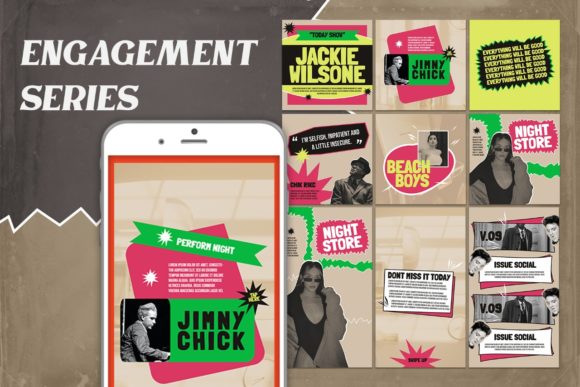
At its core, an Engagement Instagram Template is a pre-designed, customizable file—often in PSD (Adobe Photoshop) format—that provides a foundational layout for posts or stories designed to encourage audience interaction. These templates are not merely decorative backgrounds; they are strategic assets built with specific engagement triggers in mind. They incorporate clear call-to-action prompts, question boxes, poll placeholders, and visually distinct areas for text overlays that guide the viewer toward a desired action, such as commenting, sharing, or clicking a link.
Integrating Templates into Your Content Workflow
The true value of these templates emerges when they are integrated at the right stage of your content production pipeline. They are most effective during the execution phase of your social media plan. After you have completed your content calendar, brainstormed themes, and drafted captions, the template becomes the tool that brings the visual element to life quickly and consistently.
Consider a freelance educator launching a new online course. Their content plan might include a series of posts: an announcement, a student testimonial, a curriculum breakdown, and a Q&A session. Using a cohesive set of Engagement Instagram Templates ensures each post in this series shares a visual language, strengthening brand recognition. The educator doesn't start from a blank canvas each time; they select the appropriate template variation, insert their specific text and images, and export. This process can reduce the time spent on graphic design by over 70%, freeing up mental energy for the more critical tasks of community management and lesson planning.
Practical Implementation: From PSD File to Published Post
Understanding the technical workflow is key to seamless implementation. A high-quality template package, such as the 1.24 File PSD Feed Story bundle, is designed with usability in mind. The process is methodical:
- File Compatibility and Setup: The templates are provided in PSD format, requiring Adobe Photoshop or a compatible editor. The files are typically set at 300 dpi for print-quality sharpness and RGB color mode for screen display. Common dimensions like 1080 x 1080 px for feed posts and 1920 x 1080 px for stories are pre-configured, ensuring your content meets Instagram's specifications without manual adjustment.
- The Smart Object Workflow: This is the cornerstone of efficient template use. Instead of manually placing and warping images into complex layouts, you utilize Smart Object layers. The process is intuitive: you double-click on the image layer, click the layer icon within the image group, place your photograph or graphic, and save (CTRL+S). The template automatically applies any predefined effects, such as clipping masks, filters, or perspective transforms, to your image. This non-destructive editing method allows for endless experimentation and guarantees perfect alignment every time.
- Text and Finalization: All text layers remain fully editable with the text tool. You can change fonts, colors, and wording to match your brand voice. It is crucial to remember that while the structure is provided, images are not included—you must supply your own high-quality visuals to maintain authenticity and avoid copyright issues. Once customized, a simple "Save As" or export for web creates your final, ready-to-post JPEG or PNG file.
Factors for Long-Term Efficiency and Quality Control
Adopting a template-based system introduces several operational advantages beyond speed. Consistency is the most immediate benefit. Your feed begins to tell a coherent visual story, which is vital for brand building. This consistency extends to quality control; because you are working within a professionally designed layout, the risk of poor alignment, mismatched fonts, or cluttered designs is drastically reduced.
Organization is another critical factor. Savvy users create a dedicated folder system on their cloud storage or local drive: one master folder for the template kit, with subfolders for "In-Progress," "Approved," and "Published" content. This mirrors a professional asset management workflow. Furthermore, because the templates are easy to use, they can be delegated. A small business owner can brief a virtual assistant or junior team member on the monthly themes, provide the template files and the raw images, and trust that the output will meet a baseline standard of design quality.
However, a word of caution: templates should inform your process, not dictate your creativity entirely. The most effective use involves customizing the templates enough to make them uniquely yours—adjusting the color palette to your brand hex codes, swapping the placeholder iconography for your own, and writing compelling, original copy. The template is the scaffold, not the final building.
Beyond the Single Post: Strategic Applications
Think of these templates as part of a larger content ecosystem. A single template file can be the starting point for multiple content formats. The same core design for a "Top 5 Tips" carousel post can be adapted into a series of individual story slides, a Pinterest pin, or even a YouTube community post thumbnail. This cross-platform adaptability maximizes the return on your initial investment of time and money.
For those running campaigns, templates allow for rapid A/B testing. You can quickly create two versions of a post—one with a question-based CTA and another with a bold statement—to see which generates more comments, without needing to redesign the entire graphic from scratch. This fits neatly into an agile marketing workflow, where quick iterations based on performance data are key.
Ultimately, integrating Engagement Instagram Templates into your routine is about working smarter. It’s a practical solution to the dual demands of quality and frequency. By handling the structural and technical heavy lifting, these tools allow you to focus your energy on what truly matters: crafting a meaningful message, connecting with your audience, and achieving your strategic goals. The result is not just a more beautiful feed, but a more sustainable and scalable approach to digital presence.