Watercolor Splash Photo Effect Templates: A Practical Guide to Digital Artistry
Transforming a standard photograph into a piece of art that mimics traditional media is a popular goal for designers, photographers, and social media managers. Among the various digital art styles, the watercolor aesthetic remains a favorite for its organic, fluid, and expressive qualities. Watercolor Splash Photo Effect Templates offer a streamlined path to achieving this look, promising the realism of a hand-painted watercolor in just a few seconds. This guide provides a balanced evaluation of these templates, exploring their functionality, ideal use cases, and important considerations to help you decide if they are the right tool for your creative projects.
Understanding the Core Functionality
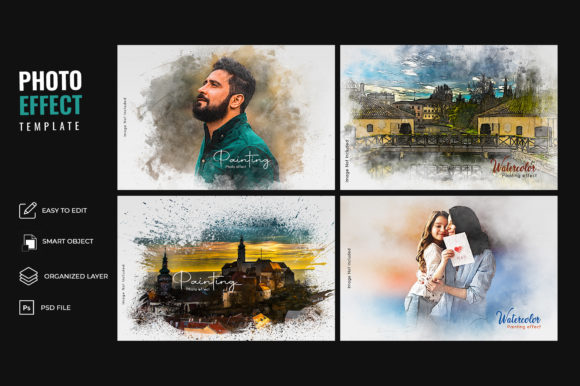
At their heart, Watercolor Splash Photo Effect Templates are pre-designed files, typically in PSD (Photoshop Document) format. They are not automated filters but rather structured frameworks that leverage Photoshop's layer system. A standard template package often includes several PSD files, each offering a different arrangement of paint splatters, brush strokes, and a foundational watercolor paper texture. The process is straightforward: you place your photograph into a designated smart object layer. Upon saving, the template's complex layer structure—including blending modes, masks, and texture overlays—automatically applies to your image, creating the illusion that it was painted with watercolors on textured paper.
The "splash" element is key to the effect's authenticity. Real watercolor paintings are characterized by unpredictable bleeds, drips, and splatters. These templates replicate that by incorporating pre-made paint splatter graphics. These elements are often on separate layers, allowing for some customization in terms of placement and scale. The underlying paper texture is equally important, as it absorbs the "paint" and provides the classic granular appearance associated with watercolor art. The combination of these elements is what creates a unique piece of art from a simple digital file.
Evaluating the Benefits and Practical Applications
The primary appeal of using these templates lies in their efficiency and consistency. For individuals or teams needing to produce a high volume of stylized images, the time savings are significant. Instead of manually painting effects or experimenting with complex software actions, a realistic watercolor effect can be generated in moments. This is particularly beneficial for:
- Social Media Content: Creating a cohesive and artistic feed for platforms like Instagram or Pinterest.
- Graphic Design Projects: Designing unique backgrounds for posters, flyers, or website banners.
- Photo Editing: Offering clients an artistic alternative to standard photo retouching for portraits or landscapes.
- Digital Art Creation: Serving as a foundational layer for more complex digital paintings or mixed-media art.
The benefit of a realistic watercolor paper texture cannot be overstated. Achieving this effect manually requires sourcing high-quality textures and understanding how to blend them convincingly. The templates handle this complex integration automatically, ensuring a professional and believable result that respects the medium's characteristics.
Key Considerations and Potential Tradeoffs
While the advantages are clear, a balanced assessment requires acknowledging the tradeoffs. The most significant consideration is the trade-off between convenience and creative control. Because the effect is pre-designed, the core aesthetic—such as the specific splatter pattern or the paper grain—is fixed. While you can adjust colors and move some elements, you are working within the template's established style. This may limit artistic expression for those seeking a completely custom or unique look.
Another important factor is the dependency on specific software. These templates are built for Adobe Photoshop and require a working knowledge of its interface, particularly smart objects and layers. Users of other editing software like Affinity Photo or GIMP may find compatibility issues. Furthermore, the quality of the final output is heavily dependent on the source image. Photographs with high contrast, clear subjects, and good lighting tend to yield the best results. A flat, low-resolution, or overly cluttered image may not translate well into a convincing watercolor effect, regardless of the template's quality.
Is This Template the Right Fit for You?
Determining if Watercolor Splash Photo Effect Templates align with your goals involves a practical self-assessment. They are a strong fit if your needs prioritize speed, consistency, and a specific, high-quality watercolor aesthetic. If you are a blogger, marketer, or designer who needs to stylize images regularly without deep expertise in digital painting, these templates are an excellent solution. They are also ideal for those who appreciate the organic look of paint splatters on watercolor paper texture but lack the time or resources to create it from scratch.
Conversely, alternatives may be worth considering in certain situations. If your project demands a one-of-a-kind, hand-crafted digital painting, investing time in learning manual painting techniques in Photoshop or using a dedicated digital painting application like Procreate or Corel Painter would be more appropriate. For users who need only a very subtle texture or a different artistic style (e.g., oil paint or charcoal), a more versatile photo effect software or a different set of templates might be a better investment. Finally, if you are not a Photoshop user, seeking out effect packs designed for your software of choice is a necessary first step.
Making an Informed Decision
When evaluating specific template packages, look beyond the marketing previews. Scrutinize the details provided. How many distinct PSD files are included? Do they offer variety in splatter placement and paper textures? Check the resolution of the files to ensure they are suitable for your intended use, whether for web or print. Reading user reviews can provide practical insights into ease of use and the realism of the final effect.
Ultimately, Watercolor Splash Photo Effect Templates are a specialized tool designed to solve a specific problem: efficiently creating a particular artistic style. They excel at what they do, offering a practical bridge between a standard photograph and a stylized watercolor artwork. By understanding their mechanics, benefits, and limitations, you can make an informed decision about whether they are the right addition to your creative toolkit. They empower users to produce unique art without the steep learning curve of traditional techniques, making artistic photo manipulation accessible to a broader audience.