Elevate Your Art Sales: A Deep Dive into 30 Wall Art Mockups - Canva Templates 3
In the bustling digital marketplace, the presentation of your artwork is almost as crucial as the art itself. Whether you are an independent artist selling prints on Etsy, a photographer showcasing your portfolio, or a graphic designer offering downloadable products, the way your work appears to a potential buyer determines the click-through rate and, ultimately, the sale. Flat images often fail to convey the texture, scale, and ambiance that a physical piece of art brings to a room. This is where high-quality mockups become an indispensable tool in your creative arsenal.
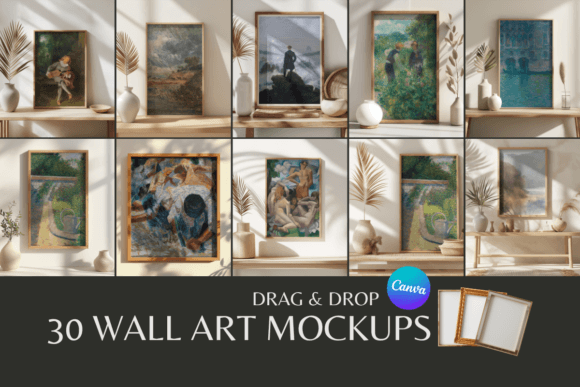
Today, we are taking a comprehensive look at the 30 Wall Art Mockups - Canva Templates 3. This specific collection is designed to bridge the gap between your digital file and a realistic physical representation. It offers a streamlined solution for creators who need professional imagery without the overhead costs of hiring a photographer or purchasing expensive 3D rendering software. By utilizing the accessibility of Canva, these templates democratize product photography, allowing anyone with an internet connection to create stunning visual assets.
Understanding the Value of Visual Context
Before diving into the specifics of this collection, it is important to understand why mockups are vital for online sales. When a customer visits an online store, they cannot touch the canvas or see how the light hits the frame. They rely entirely on the visual information provided. A generic white background often leaves too much to the imagination. In contrast, a lifestyle mockup—showing the art hanging above a sofa, a mantelpiece, or a desk—provides immediate context.
This context helps the buyer visualize the item in their own space. It answers subconscious questions about size, color harmony, and style compatibility. The 30 Wall Art Mockups - Canva Templates 3 addresses this need by offering a variety of settings that can help an artist tell a story about their work. Instead of just selling a picture of a flower, you are selling the feeling of a calm, botanical living room. This psychological shift is a powerful sales driver.
What Exactly is Included?
Let’s break down what you receive when you acquire this product. The package is designed with user convenience in mind, specifically targeting those who may not have advanced technical skills in software like Photoshop.
The download consists of a ZIP file containing a PDF. This PDF serves as your central hub, containing direct links to 30 distinct Wall Art Canva Mockups. This delivery method ensures that you do not need to manually upload files to Canva; instead, you simply click a link, and a copy of the template is instantly created in your Canva account.
Each of the 30 templates represents a different scene. You might find minimalist interiors, cozy studio settings, or modern office environments. The variety is key here, as it allows you to match the mockup to the specific aesthetic of the artwork you are trying to sell. If you are selling abstract modern art, you can choose a sleek, contemporary room. If you are selling vintage botanical prints, you can opt for a setting with classic furniture and warm lighting.
The Canva Advantage: Accessibility and Ease of Use
One of the standout features of the 30 Wall Art Mockups - Canva Templates 3 is its reliance on Canva. For the uninitiated, Canva is a free, browser-based graphic design platform that has become the industry standard for non-designers due to its intuitive drag-and-drop interface.
A significant barrier to entry for many mockup products is the requirement for a Canva Pro subscription to utilize "Smart Mockups" or specific editing features. However, these templates are designed to be fully editable in Canva without requiring a Pro subscription. This is a massive benefit for hobbyists or small business owners watching their overhead costs. It ensures that your ability to present your work professionally is not gated behind a monthly paywall.
How the Editing Process Works
The workflow for using these templates is straightforward, making it accessible even for those who consider themselves "non-techy." Here is a typical step-by-step breakdown of how you would utilize the 30 Wall Art Mockups - Canva Templates 3:
- Download and Unzip: After purchase, download the ZIP file to your computer. Extract the contents to reveal the PDF guide.
- Access the Links: Open the PDF and click on the link corresponding to the mockup you wish to use.
- Copy the Template: Canva will prompt you to make a copy of the design. This ensures the original template remains untouched for future use.
- Insert Your Artwork: Within the Canva editor, you will see a placeholder image. You simply upload your artwork file (usually a high-resolution PNG or JPG) and drag it over the placeholder. Canva’s interface usually allows you to position and resize the image to fit the frame perfectly.
- Download Your Image: Once satisfied, you download the final image as a high-quality PNG or JPG, ready to be uploaded to your Etsy listing or Shopify store.
Who Stands to Benefit the Most?
While this product is broadly useful, certain groups will find the 30 Wall Art Mockups - Canva Templates 3 particularly transformative for their workflow.
Etsy and Shopify Sellers
For print-on-demand businesses and digital download sellers, visual consistency is vital. These mockups allow sellers to maintain a cohesive aesthetic across their shop. Instead of having a chaotic mix of different lighting and styles from random free sources, you can curate a look that feels professional and intentional. High-quality mockups also increase the perceived value of the product, allowing you to price your work competitively.
Interior Designers and Decorators
Professionals in the interior design space often need to show clients how a specific piece of art will look in a proposed room design. These mockups can be used to visualize concepts quickly. Instead of trying to explain, "Imagine a large abstract piece here," you can show the client a realistic rendering of the space, complete with the specific artwork.
Graphic Designers and Illustrators
If you are pitching a poster design to a client, presenting it as a flat file on a slide deck can feel underwhelming. By placing that design into one of the 30 Wall Art Mockups - Canva Templates 3, you immediately elevate your presentation. It shows the client that you are thinking about the end-use of the product, not just the design itself.
Analyzing the Features and Limitations
To provide a balanced view, it is necessary to look at both the strengths and the considerations of this product.
Strengths
- Cost-Effective: Acquiring 30 unique scenes for a one-time price is significantly cheaper than hiring a photographer for a single shoot.
- No Pro Subscription Required: The accessibility for free Canva users is a major selling point.
- Variety: Having 30 options ensures you won't run out of backgrounds quickly, allowing for a diverse product catalog.
- Commercial Use: The license generally allows for commercial use of the final images (the mockup combined with your art), which is essential for business owners.
Considerations and Limitations
It is also important to understand the boundaries of the product. First, while commercial use is allowed for the final composite image, redistribution of the unedited mockups is prohibited. You cannot resell the templates themselves or give them away to others.
Second, while Canva is powerful, it has limitations compared to advanced software like Photoshop. You may have less control over shadows, reflections, or the warp of the image on the canvas surface. However, for 95% of online selling scenarios, the quality provided by Canva is more than sufficient.
Real-World Scenarios: Putting the Mockups to Work
To truly appreciate the utility of the 30 Wall Art Mockups - Canva Templates 3, let’s visualize a few practical scenarios.
Scenario A: The Holiday Sale. You are a photographer planning a "Black Friday" sale. You want your shop to feel warm and inviting. You select three mockups from the collection that feature cozy living rooms with soft lighting. You apply your landscape photography to these mockups. The result is a shop front that feels like a curated gallery rather than a file dump, likely increasing customer engagement.
Scenario B: The Client Pitch. You are a freelance illustrator pitching a series of prints for a coffee shop. You use the mockups to show your art hanging on exposed brick walls and minimalist cafe settings. The client can instantly see how your art fits their brand vibe, making the approval process much faster.
Scenario C: Social Media Marketing. You need to post on Instagram daily to keep your audience engaged. Using the 30 different templates, you can ensure that your feed never looks repetitive. You can rotate between different interior styles, keeping your content fresh and interesting for your followers.
Evaluating Suitability for Your Needs
When deciding if this product is right for you, consider the volume of work you produce. If you only create one piece of art a year, a single stock photo might suffice. However, if you are actively building a portfolio or running a shop with multiple listings, the efficiency of having 30 ready-to-go templates cannot be overstated.
Furthermore, assess the aesthetic of your work. Browse the previews of the 30 Wall Art Mockups - Canva Templates 3 to ensure the interior styles match your artistic voice. If you create hyper-modern digital art, ensure the collection includes contemporary settings. If you create rustic folk art, look for warmer, textured environments.
Final Thoughts on Professional Presentation
In the crowded world of e-commerce, details matter. The transition from an amateur seller to a professional brand often hinges on presentation. The 30 Wall Art Mockups - Canva Templates 3 provides a robust, accessible, and affordable toolkit to make that transition.
By removing the technical barriers associated with photo editing and the financial barriers of professional photography, these templates empower creators to focus on what they do best: creating. Whether you are revamping your Etsy store, building a portfolio, or pitching to clients, having a library of high-quality mockups at your fingertips is a strategic advantage that can help drive your success in your creative projects.